

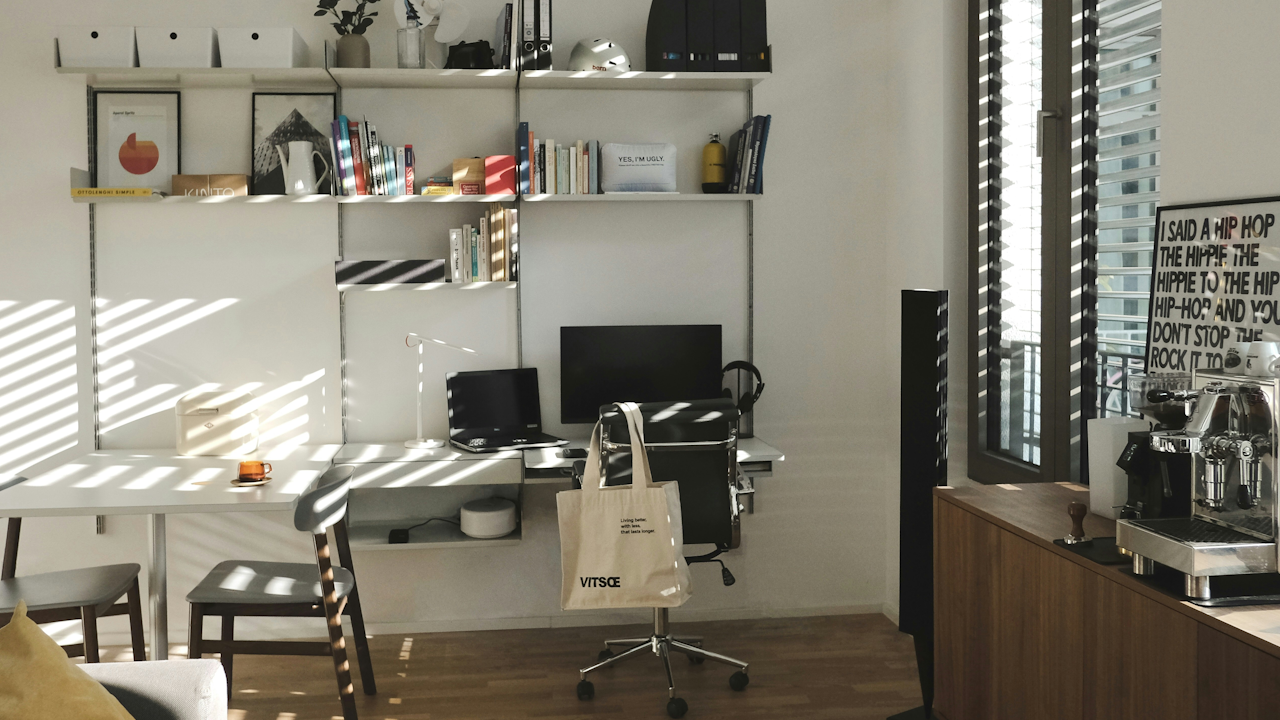
The shift toward remote and hybrid work has transformed countless spare rooms, corners of living areas, and even closets into dedicated workspaces. A home office is no longer a luxury reserved for executives or freelancers with flexible schedules. It has become an essential environment for millions of professionals who seek to maintain focus, efficiency, and well-being without the daily commute. Designing a productive home office requires more than simply placing a desk against a wall. It demands thoughtful planning that balances functionality, comfort, health, and personal style. This article explores every aspect of creating such a space, offering practical guidance drawn from ergonomic principles, interior design best practices, and real world productivity strategies.
Understanding the core purpose of a home office sets the foundation. Unlike a corporate cubicle or open plan office, a home workspace must support sustained concentration while adapting to the unique rhythms of domestic life. Productivity here means more than completing tasks on time. It includes reducing mental fatigue, minimizing distractions, and fostering a sense of control over one’s environment. Research consistently shows that well designed workspaces can increase output by up to twenty percent while lowering stress levels. The right setup also helps prevent common physical complaints such as back pain, eye strain, and repetitive strain injuries that arise from poor posture or inadequate equipment.
Begin by evaluating the available space in your home. Location matters more than square footage. Choose an area that receives consistent natural light if possible, yet remains relatively quiet and separate from high traffic zones like kitchens or play areas. A spare bedroom often works well because it already has a door for privacy. If no dedicated room exists, consider a corner of a living room screened by a room divider or bookshelves. Measure the floor area carefully and note power outlets, window placement, and wall dimensions. Sketch a simple floor plan on paper or use a free digital tool to test layouts before purchasing any furniture. Factor in future needs too. Will the space need to accommodate video calls, multiple monitors, or occasional guest use? Anticipating these details prevents costly rearrangements later.
Ergonomics forms the backbone of any productive office. Start with the chair, the single most important piece of equipment. Select a model with adjustable height, lumbar support, and breathable fabric or mesh. The seat should allow feet to rest flat on the floor with knees bent at roughly ninety degrees. Armrests should align with the elbows when typing so shoulders remain relaxed. Pair the chair with a desk that sits at elbow height when arms rest naturally. Standing desks or adjustable height models offer versatility for those who prefer alternating between sitting and standing throughout the day. Monitor placement follows a simple rule: the top of the screen should sit at or slightly below eye level, positioned an arm’s length away to reduce neck strain. Use a separate keyboard and mouse rather than a laptop’s built in versions unless a riser elevates the screen properly. Wrist rests and footrests provide additional support for long sessions.
Lighting plays a critical role in maintaining focus and protecting eyesight. Natural daylight boosts mood and alertness, so position the desk perpendicular to windows rather than directly in front of or behind them. This orientation prevents glare on screens while still allowing ambient light to fill the room. For artificial lighting, combine overhead fixtures with task lamps. A desk lamp with an adjustable arm and warm to cool color temperature settings lets you customize illumination for different times of day. Avoid harsh fluorescent bulbs; opt instead for LED options that mimic daylight. Layered lighting that includes ambient, task, and accent sources creates depth and reduces eye fatigue during extended work periods.
Color psychology influences concentration more than many people realize. Soft blues and greens promote calm and sustained attention, making them ideal for walls or large surfaces. Warmer neutrals such as beige or light gray provide a versatile backdrop that feels professional yet welcoming. Avoid overly saturated reds or bright yellows, which can increase heart rate and distract rather than energize. If the room feels too sterile, introduce subtle accents through textiles or small accessories rather than painting entire walls in bold hues. The goal is a balanced palette that supports mental clarity without competing for attention.
Storage and organization keep the mind uncluttered. Cluttered surfaces drain cognitive resources, so incorporate vertical storage solutions whenever possible. Wall mounted shelves, pegboards, and floating cabinets maximize floor space while keeping supplies within easy reach. Drawer organizers, cable trays, and monitor arms eliminate visual chaos beneath and around the desk. Adopt a daily reset routine: spend five minutes at the end of each workday clearing the workspace so the next morning begins with a fresh slate. Digital organization complements physical order. Use cloud storage, project management software, and consistent file naming conventions to ensure information stays accessible without physical piles of paper.
Technology infrastructure determines whether a home office feels seamless or frustrating. High speed internet ranks as the top priority. Test connection speeds in the chosen location and consider a wired Ethernet connection for video calls and large file transfers. Multiple monitors expand screen real estate and improve multitasking efficiency; many professionals report completing tasks twenty to thirty percent faster with dual displays. Noise cancelling headphones or a white noise machine help mask household sounds. Invest in a reliable uninterruptible power supply to protect equipment during outages. Backup systems, ergonomic peripherals, and regular software updates round out a resilient tech setup that minimizes downtime.
Personalization transforms a functional workspace into an inspiring one. Add elements that reflect individual taste without overwhelming the senses. A few houseplants improve air quality and provide a visual break during focused work. Artwork or photographs hung at eye level can spark creativity, while a small vision board or motivational quote keeps long term goals visible. The key lies in moderation. Too many decorative items become distractions, so limit personal touches to three or four meaningful pieces. Scent can also play a subtle role; a diffuser with essential oils such as rosemary or peppermint may enhance alertness for some users.
Acoustic comfort often gets overlooked yet dramatically affects concentration. Hard surfaces like wood floors and bare walls amplify echoes and external noise. Introduce soft furnishings such as area rugs, curtains, and upholstered chairs to absorb sound. Acoustic panels or bookshelves filled with books serve dual purposes as sound buffers and storage. If the home office shares walls with noisy areas, consider adding weather stripping to doors or installing a sound machine that generates steady background noise. For those who thrive with music, instrumental playlists or ambient tracks provide stimulation without lyrics that might pull attention away from tasks.
Small or shared homes require creative solutions for multi functional spaces. Murphy desks that fold into the wall or rolling carts that tuck away when not in use preserve living areas during non work hours. Room dividers made from fabric panels or open shelving create visual separation without permanent construction. In studio apartments, a tall bookcase positioned behind the desk can define the workspace while doubling as storage. Clear boundaries, even symbolic ones like a dedicated rug or lamp, signal to family members and to oneself that work time has begun.
Sustainability adds another layer of value to home office design. Choose furniture crafted from responsibly sourced wood or recycled materials. Energy efficient lighting and devices reduce electricity bills and environmental impact. Modular pieces that can be reconfigured or upgraded extend product lifespan and minimize waste. Second hand office furniture, when cleaned and inspected, often offers excellent quality at a fraction of new prices. These choices align productivity with broader values of resource conservation.
Budget constraints need not compromise quality. Prioritize the items that directly affect posture and daily comfort: ergonomic chair first, then desk, then lighting. Many affordable brands now offer adjustable models that rival high end options. Shop sales, compare online reviews, and consider refurbished equipment from reputable sellers. DIY solutions such as riser blocks for monitors or repurposed nightstands as side tables stretch resources creatively. Over time, incremental upgrades yield a space that grows with changing needs rather than requiring a complete overhaul.
Common pitfalls derail even the best intentions. Placing the desk facing a blank wall may feel efficient but can lead to feelings of isolation. Conversely, facing a busy window might invite constant distraction. Overlooking cable management creates trip hazards and visual clutter that subconsciously raises stress. Neglecting regular maintenance, such as cleaning screens or adjusting chair settings, allows small discomforts to accumulate into larger problems. Another frequent mistake involves treating the home office as an afterthought storage area; resist the urge to pile laundry or household items on the desk.
Successful home offices share several traits regardless of size or budget. They feel intentional rather than improvised. They support the specific work style of the user, whether that involves deep focus writing sessions or collaborative video meetings. They evolve over time as technology advances and personal preferences shift. Most importantly, they create a boundary between professional and personal life that protects both productivity and rest.
Consider a few illustrative examples. A graphic designer working from a converted attic installed a large skylight and positioned an L shaped desk beneath it to maximize natural light for color accurate work. Cable channels hidden behind the desk legs kept the space tidy, and a second monitor mounted on an arm allowed seamless switching between design software and reference materials. Another professional, a software developer in a one bedroom apartment, used a wall mounted folding desk paired with a comfortable office chair on casters. When the workday ended, the desk folded up and the chair rolled into a closet, restoring the living area for evening relaxation. These setups demonstrate that thoughtful design adapts to constraints while amplifying strengths.
Maintenance routines keep the space performing at its peak. Schedule quarterly deep cleans to dust electronics and reorganize drawers. Every six months, reassess ergonomics by taking a fresh look at posture and screen height. Technology upgrades, such as faster routers or newer peripherals, should align with actual workflow needs rather than marketing hype. Seasonal adjustments, like adding a small heater in winter or improving airflow in summer, ensure year round comfort.
Ultimately, a productive home office represents an investment in both career success and personal well being. It acknowledges that work happens best when the environment supports the human body and mind rather than fighting against them. By focusing on ergonomics, lighting, organization, technology, and thoughtful personalization, anyone can craft a space that enhances daily output and reduces burnout. The process need not be overwhelming. Start with one or two high impact changes, such as upgrading the chair or optimizing monitor placement, then build outward. Over weeks and months, the cumulative effect transforms an ordinary room into a tailored environment that feels motivating each time the workday begins.
The future of work continues to blur the lines between office and home, making intentional design more relevant than ever. Whether the goal involves climbing the corporate ladder from a spare bedroom or building a thriving freelance career in a corner nook, the principles remain consistent. Clarity, comfort, and control define the difference between merely working from home and truly thriving within a space built for productivity. With careful planning and ongoing attention, a home office becomes more than a place to check email or attend meetings. It becomes a personal command center for creativity, efficiency, and professional fulfillment.